2 releases
| new 0.1.1 | Jun 3, 2026 |
|---|---|
| 0.1.0 | May 30, 2026 |
#5 in #vnc
Used in 3 crates
59KB
515 lines
robost
robost = robot + robust + Rust
A Rust-based OSS desktop automation (RPA) tool.
日本語 | 中文 | Documentation
Screenshots
| Scenario YAML | Run Output |
|---|---|
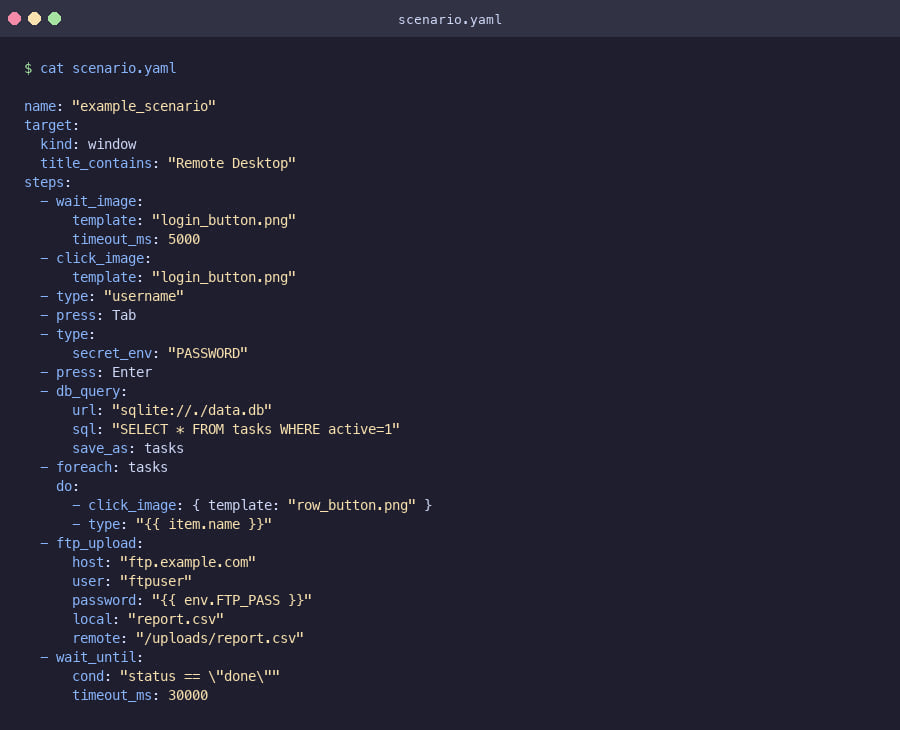 |
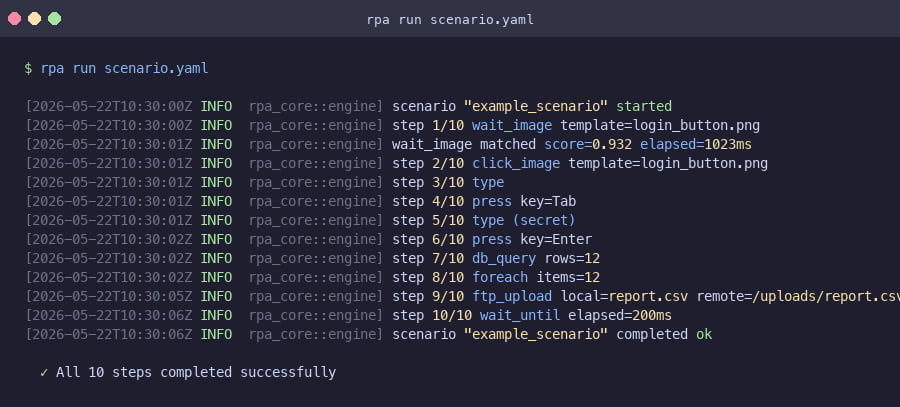 |
Visual Scenario Editor
| List View — step list with node palette | Canvas View — free-placement flowchart |
|---|---|
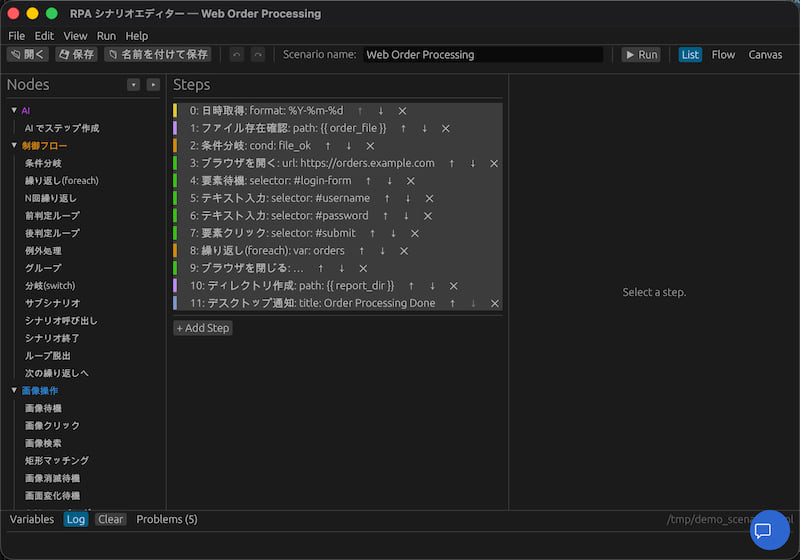 |
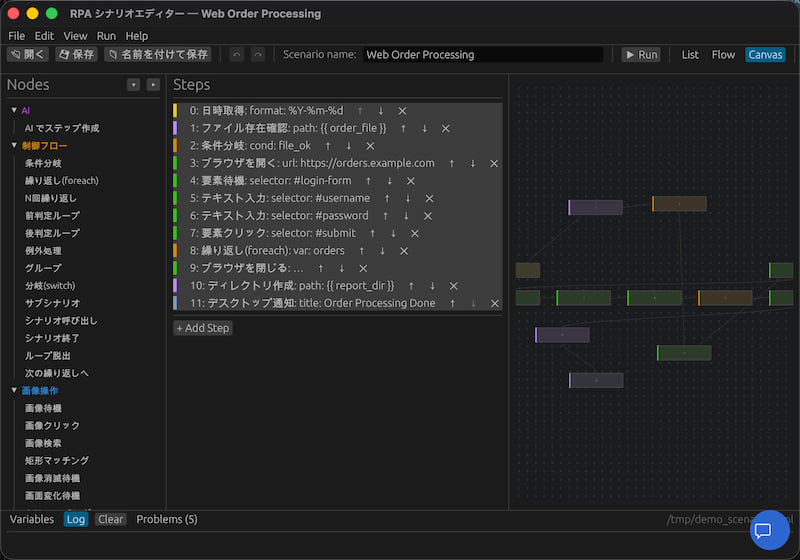 |
| Node Configuration | Template Picker |
|---|---|
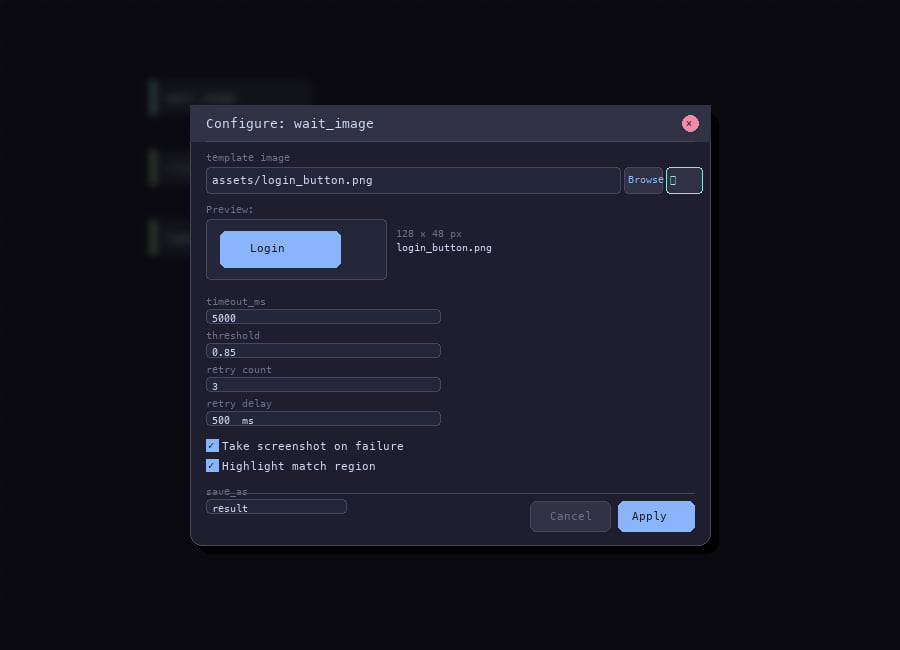 |
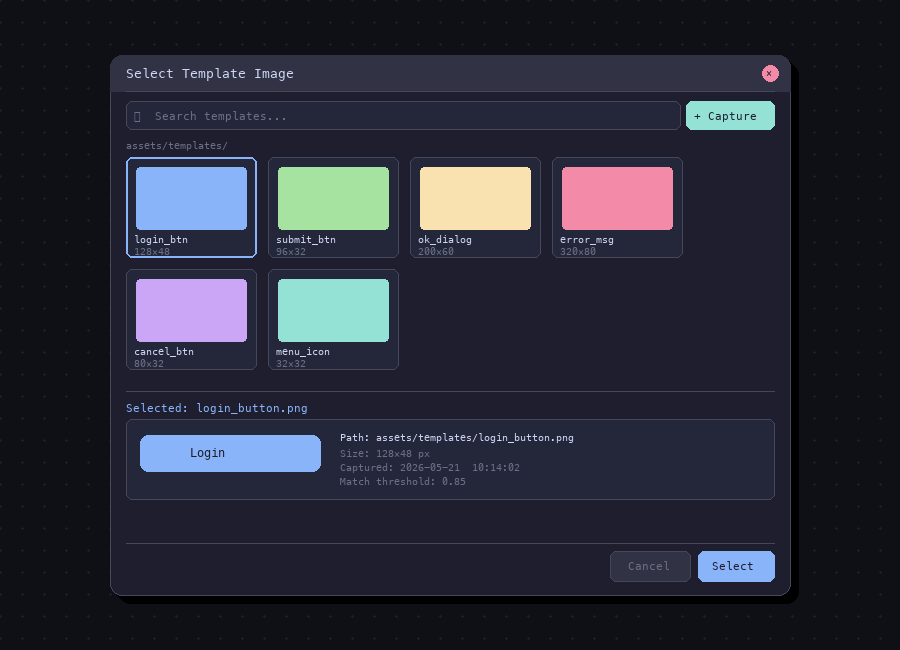 |
| AI Panel | CLI Help |
|---|---|
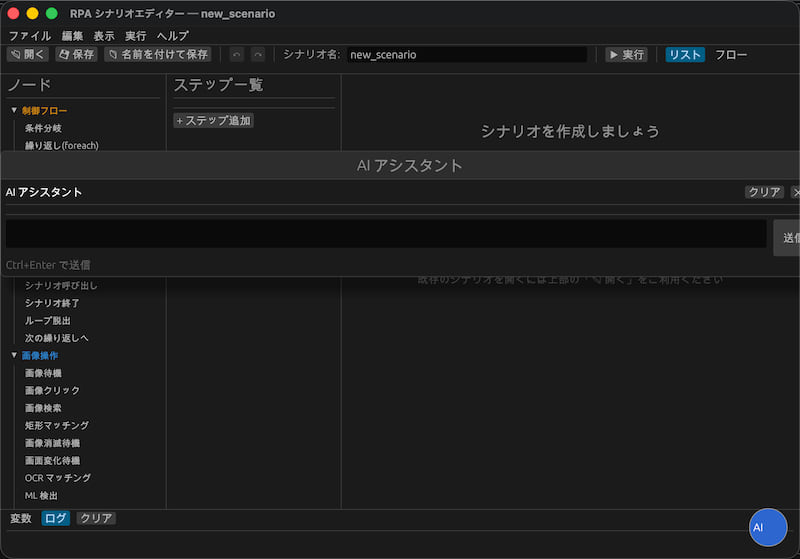 |
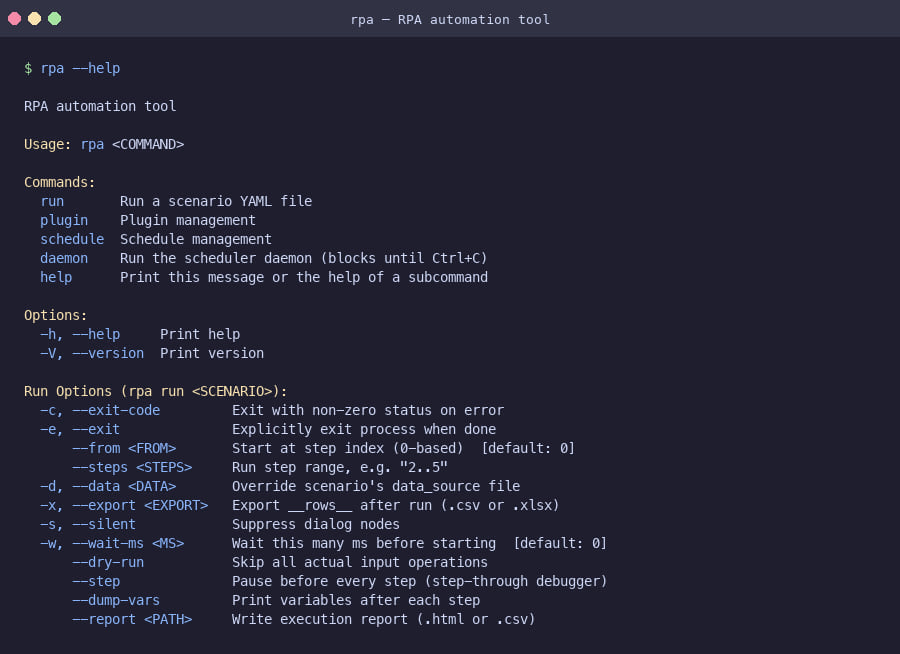 |
Download
Latest release: GitHub Releases
robost-editor — Visual Scenario Editor
| Platform | Download |
|---|---|
| macOS (Apple Silicon) | robost-editor-aarch64-apple-darwin.tar.gz |
| macOS (Intel) | robost-editor-x86_64-apple-darwin.tar.gz |
| Windows | robost-editor-x86_64-windows.zip |
rpa — CLI Runner
| Platform | Download |
|---|---|
| macOS (Apple Silicon) | rpa-aarch64-apple-darwin.tar.gz |
| macOS (Intel) | rpa-x86_64-apple-darwin.tar.gz |
| Windows | rpa-x86_64-windows.zip |
Key Features
- Image recognition — NCC template matching (multi-scale), OCR via Tesseract, ONNX ML detection
- Remote desktop — captures the RDP/Citrix/VNC window locally; no agent needed on the target machine
- Transient UI capture — hotkey freezes the screen so you can select dropdowns and tooltips that would otherwise disappear
- WASM plugins — sandboxed extensions; a crashing plugin can't bring down the runner
- Plain YAML scenarios — variables, loops, branches, inline Rhai scripts, sub-scenarios, data sources
- Visual editor — list and Canvas view (free-placement, zoom/pan, minimap, snap, align/distribute), AI step creation from natural language, AI scenario assistant (Anthropic/OpenAI), context menu tooltips, full i18n (EN/JA/ZH)
Comparison with Automation Tools
| Feature | robost | WinActor | UiPath | PyAutoGUI | SikuliX | Robot Framework |
|---|---|---|---|---|---|---|
| License | MIT / Apache-2.0 | Commercial | Commercial | MIT | MIT | Apache-2.0 |
| Language | Rust (YAML scenarios) | Proprietary GUI | Proprietary GUI | Python | Java (Jython) | Python |
| Open source | Yes | No | No | Yes | Yes | Yes |
| Remote desktop (RDP/Citrix/VNC) | Yes — no agent needed | Yes | Yes (agent required) | No | No | No |
| Image recognition | Yes — multi-scale NCC | Yes | Yes — AI-assisted | No | Yes — pixel-exact | No (via plugins) |
| Web browser automation | Yes — WebDriver | Yes | Yes | No | No | Yes (via SeleniumLibrary) |
| Excel automation | Yes — cell/sheet/formula | Yes | Yes | No | No | No (via plugins) |
| Word / PowerPoint | — Phase 2 | Yes | Yes | No | No | No |
| SAP GUI automation | — Phase 2 | Yes | Yes | No | No | No |
| Scenario recorder | — Phase 2 | Yes | Yes | No | No | No |
| Orchestrator (central management) | — Phase 3 | Yes (limited) | Yes | No | No | No |
| Transient UI capture (dropdowns, tooltips) | Yes — freeze + overlay | Yes | Partial | No | No | No |
| Multi-scale DPI resilience (125%/150%) | Yes — built-in | Partial | Partial | No | No | No |
| WASM plugin sandbox | Yes — memory-safe | No | No | No | No | No |
| Inline scripting | Yes — Rhai (sandboxed) | Partial | VB.NET / C# | Python itself | Jython | Python |
| Scenario version control | Yes — plain YAML | No | Partial | Yes — Python | Partial — .sikuli dirs |
Yes — plain text |
| Startup overhead | ~10 ms (native binary) | Several seconds | Several seconds | Python startup | JVM startup (~2 s) | Python startup |
| OCR support | Yes (Tesseract, optional) | Yes | Yes | No | Partial | No (via plugins) |
Why robost?
The main reason to reach for robost over PyAutoGUI or SikuliX is RDP/Citrix support without an agent. It captures the remote desktop window on the local machine and sends input through enigo, so it works regardless of what's running on the other end. Multi-scale NCC matching also handles DPI scaling (100/125/150%) that breaks pixel-perfect tools.
The scenario format is close to WinActor's node vocabulary (click_image, wait_image, foreach, dialog_input, …), so migrating existing automations is fairly direct. Scenarios are plain YAML — readable in any text editor and diffable in git with no proprietary tooling involved.
Plugins run in a WASM sandbox: permissions are declared in plugin.toml and enforced at runtime. A plugin can only access what it declared, and if it panics, the runner keeps going. Plugins can be written in Rust, AssemblyScript, Go, or C — anything that compiles to .wasm.
Architecture
crates/
├── robost-capture/      # Screen/window capture (xcap, DPI-aware)
├── robost-input/        # Mouse/keyboard input + window focus (enigo)
├── robost-vision/       # Template matching (NCC), OCR, ML detection
├── robost-backend/      # Backend trait: Local / RDP / VNC unified
├── robost-core/         # Scenario engine: YAML parsing, step execution, retry, flow control
├── robost-snip/         # Template capture GUI (tray app, hotkey, overlay, Japanese UI)
├── robost-editor/       # Visual scenario editor (list + Canvas view, AI step creation, AI chat, i18n EN/JA/ZH)
├── robost-template/     # Shared coordinate/geometry types
├── robost-plugin-api/   # Public plugin author API (crates.io publish candidate)
├── robost-plugin-host/  # wasmtime-based WASM plugin runner with epoch timeout
├── robost-script/       # Rhai inline scripting (sandboxed)
├── robost-stdlib/       # Built-in scenario node library
└── robost-cli/          # CLI binary
Quick Start
cargo build --workspace
cargo run -p robost-cli -- run scenario.yaml
Scenario Format
name: "example"
target:
  kind: window
  title_contains: "MyApp"
variables:
  retry_count: 0
steps:
  # Image operations
  - wait_image:  { template: login_button.png, timeout_ms: 5000 }
  - click_image: { template: login_button.png, action: left, offset_x: 0, offset_y: 0 }
  - find_image:  { template: icon.png, save_as: pos }  # {found, x, y, score}
  - match_rect:
      template: badge.png
      rect: { x: 100, y: 200, width: 300, height: 100 }
      save_as: result

  # OCR (requires Tesseract + --features ocr)
  - ocr_match:
      contains: "Login"
      lang: "jpn+eng"
      timeout_ms: 5000
      save_as: ocr_result   # {found, text}

  # Input
  - type: "username"
  - type: { secret_env: PASSWORD }
  - press: Tab

  # Variables
  - set:          { name: count, value: 0 }
  - increment:    { name: count, by: 1 }
  - copy_var:     { from: src, to: dst }
  - get_datetime: { format: "%Y%m%d", save_as: today }
  - get_username: { save_as: user }
  - calc:         { expr: "count * 2", save_as: doubled }
  - to_fullwidth: { value: "abc", save_as: full }
  - to_halfwidth: { value: "abc", save_as: half }

  # Clipboard
  - clipboard_set: { value: "{{ text }}" }
  - clipboard_get: { save_as: copied }

  # Shell
  - shell: { cmd: python3, args: [script.py], save_as: output, timeout_ms: 30000 }

  # Flow control
  - if:
      cond: "count > 10"
      then: [ { press: Escape } ]
      else: [ { wait_ms: 500 } ]
  - switch:
      on: status
      cases:
        - when: "ok"
          do: [ { click_image: { template: ok.png } } ]
      default: [ { press: Escape } ]
  - repeat:  { count: 3, do: [ { wait_ms: 1000 } ] }
  - while:   { cond: "found", do: [ { wait_image: { template: spinner.png } } ] }
  - foreach: { var: __rows__, do: [ { type: "{{ name }}" } ] }
  - try_catch:
      try:   [ { click_image: { template: btn.png } } ]
      catch: [ { set: { name: _error, value: "failed" } } ]
      finally: [ { wait_ms: 100 } ]
  - group:   { name: "login block", do: [ { type: "user" } ] }
  - break
  - continue
  - exit

  # User interaction (CLI: stdin; silent mode: uses defaults)
  - dialog_wait:   { message: "Check the screen, then press Enter.", title: "Waiting" }
  - dialog_input:  { message: "Enter filename:", default: "output.xlsx", save_as: fname }
  - dialog_select: { message: "Choose action:", options: [Save, Skip, Abort], save_as: choice }

  # Screenshot / observation
  - screenshot_save: { path: "caps/{{ today }}.png" }                    # full screen
  - screenshot_save: { path: "caps/win.png", window: "MyApp" }           # specific window
  - wait_no_image:   { template: spinner.png, timeout_ms: 30000 }        # wait until gone

  # System integration
  - url_open: { url: "https://example.com/report" }
  - notify:   { title: "Done", message: "{{ count }} rows processed" }

  # Window
  - wait_window:    { title_contains: "MyApp", state: exists, timeout_ms: 10000 }
  - window_control: { title_contains: "Notepad", action: focus }  # focus|maximize|minimize|close

  # Log
  - log_write: { file: run.log, message: "step {{ count }} done", level: info }  # info|warn|error|debug

  # File operations
  - file_exists:      { path: data.csv, save_as: exists }
  - file_copy:        { src: a.txt, dst: b.txt }
  - file_move:        { src: tmp.txt, dst: archive/tmp.txt }
  - file_delete:      { path: old.txt }
  - file_rename:      { path: a.txt, name: b.txt }
  - file_list:        { dir: "logs", pattern: "*.log", save_as: files }
  - file_read:        { path: notes.txt, save_as: content }
  - file_write:       { path: out.txt, content: "{{ result }}", mode: overwrite }  # overwrite|append
  - file_append:      { path: out.txt, content: "{{ line }}\n" }
  - file_size:        { path: data.xlsx, save_as: size_bytes }
  - file_modified_at: { path: data.xlsx, format: "%Y-%m-%d %H:%M:%S", save_as: mtime }

  # Directory operations
  - dir_create: { path: "output/logs" }
  - dir_delete: { path: "tmp", recursive: true, ignore_missing: true }
  - dir_exists: { path: "output", save_as: exists }

  # Process operations
  - process_start:  { command: notepad.exe, wait_ms: 500 }
  - process_kill:   { name: notepad.exe }
  - process_exists: { name: notepad.exe, save_as: running }
  - wait_process:   { name: notepad.exe, state: started, timeout_ms: 10000 }  # started|exited

  # Date operations
  - date_format: { value: "{{ today }}", format: "%Y/%m/%d", save_as: formatted }
  - date_add:    { value: "{{ today }}", days: 7, save_as: next_week }
  - date_diff:   { from: "{{ start }}", to: "{{ end }}", unit: days, save_as: elapsed }

  # String operations
  - string_replace:   { value: "{{ text }}", from: "old", to: "new", save_as: result }
  - string_trim:      { value: "  hello  ", save_as: trimmed }
  - string_upper:     { value: "{{ text }}", save_as: upper }
  - string_lower:     { value: "{{ text }}", save_as: lower }
  - string_substring: { value: "{{ text }}", start: 0, length: 5, save_as: sub }
  - string_length:    { value: "{{ text }}", save_as: len }
  - string_split:     { value: "a,b,c", delimiter: ",", save_as: parts }
  - string_join:      { value: parts, separator: ", ", save_as: joined }
  - string_regex:     { value: "{{ text }}", pattern: "\\d+", save_as: match }

  # String query
  - string_contains:    { value: "{{ text }}", search: "hello", save_as: found }
  - string_starts_with: { value: "{{ text }}", search: "http", save_as: found }
  - string_ends_with:   { value: "{{ text }}", search: ".xlsx", save_as: found }
  - string_index_of:    { value: "{{ text }}", search: ":", save_as: pos }  # 0-based; -1 if not found
  - string_count:       { value: "hello world hello", search: "hello", save_as: n }

  # String format / base64
  - string_format: { format: "Hello, {0}! ({1} items)", args: [name, count], save_as: msg }
  - base64_encode: { value: "{{ content }}", save_as: encoded }
  - base64_decode: { value: "{{ encoded }}", save_as: decoded }

  # JSON / Path / Env
  - json_parse:     { value: "{\"k\":1}", save_as: obj }
  - json_stringify: { value: "{{ obj }}", save_as: json_str }
  - path_join:      { parts: ["dir", "sub", "file.txt"], save_as: full_path }
  - path_basename:  { path: "/dir/file.txt", save_as: name }
  - path_dirname:   { path: "/dir/file.txt", save_as: dir }
  - env_get:        { name: HOME, save_as: home_dir }

  # Mouse coordinate operations
  - mouse_move:      { x: 500, y: 300 }
  - mouse_click_xy:  { x: 500, y: 300, button: left }  # left|right|double
  - mouse_drag:      { from_x: 100, from_y: 100, to_x: 400, to_y: 400, hold_ms: 100 }
  - mouse_scroll:    { direction: down, amount: 3 }    # up|down|left|right
  - mouse_hover:     { x: 500, y: 300, hover_ms: 500 }
  - click_in_window: { window: "Notepad", x: 100, y: 50, action: left }  # left|right|double

  # Key combination
  - key_combo: { keys: [ctrl, c] }           # Ctrl+C
  - key_combo: { keys: [ctrl, shift, tab] }  # Ctrl+Shift+Tab

  # CSV operations
  - csv_read:  { path: data.csv, has_header: true, save_as: rows }
  - csv_write: { path: out.csv, rows: "{{ rows }}", mode: overwrite }  # overwrite|append

  # HTTP (requires feature = "http")
  - http_get:    { url: "https://api.example.com/items", save_as: resp }
  - http_post:   { url: "https://api.example.com/items", body: "{{ payload }}", save_as: resp }
  - http_put:    { url: "https://api.example.com/items/1", body: "{{ payload }}", save_as: resp }
  - http_delete: { url: "https://api.example.com/items/1", save_as: resp }
  - http_patch:  { url: "https://api.example.com/items/1", body: "{{ patch }}", save_as: resp }
  # With authentication
  - http_get:    { url: "https://api.example.com/secure", auth: { basic: { user: "u", password: "p" } }, save_as: resp }
  - http_post:   { url: "https://api.example.com/secure", body: "{{ payload }}", auth: { bearer: { token: "{{ tok }}" } }, save_as: resp }

  # Excel cell / range (requires feature = "excel-write" for write ops)
  - excel_read_cell:   { file: data.xlsx, sheet: Sheet1, cell: A2, save_as: cell_val }
  - excel_read_range:  { file: data.xlsx, sheet: Sheet1, range: "A2:Z10", save_as: table }
  - excel_write_cell:  { file: data.xlsx, sheet: Sheet1, cell: A2, value: "{{ result }}" }
  - excel_write_range: { file: data.xlsx, sheet: Sheet1, cell: A2, data: "{{ rows }}" }

  # Excel sheet management (requires feature = "excel-write")
  - excel_add_sheet:    { file: data.xlsx, name: NewSheet }
  - excel_delete_sheet: { file: data.xlsx, name: OldSheet }
  - excel_rename_sheet: { file: data.xlsx, from_name: Sheet1, to_name: Data }
  - excel_read_sheet:   { file: data.xlsx, sheet: Sheet1, has_header: true, save_as: rows }
  - excel_get_dims:     { file: data.xlsx, sheet: Sheet1, save_as: dims }  # {rows, cols}
  - excel_find_row:     { file: data.xlsx, col: A, value: "{{ search }}", save_as: row_num }  # 1-based or -1

  # Mail (IMAP receive / SMTP send)
  - mail_receive:
      host: "imap.example.com"
      user: "{{ env_user }}"
      password: "{{ env_pass }}"
      folder: INBOX
      count: 10
      only_unseen: true
      save_as: emails   # [{subject, from, date, body, seen}]
  - mail_send:
      host: "smtp.example.com"
      user: "{{ env_user }}"
      password: "{{ env_pass }}"
      from: "bot@example.com"
      to: "user@example.com"
      subject: "Weekly report"
      body: "{{ report }}"

  # Webhook notifications
  - notify_slack: { url: "{{ SLACK_WEBHOOK }}", message: "{{ count }} rows processed" }
  - notify_teams: { url: "{{ TEAMS_WEBHOOK }}", title: "Done", message: "{{ count }} rows processed" }

  # OS Keychain (macOS Keychain / Windows Credential Manager / Linux Secret Service)
  - keychain_set:    { service: myapp, account: api_key, value: "{{ secret }}" }
  - keychain_get:    { service: myapp, account: api_key, save_as: secret }
  - keychain_delete: { service: myapp, account: api_key }

  # Scheduler (see `rpa schedule` CLI)
  # Scenarios are triggered via cron — no inline step needed

  # Pixel / color
  - get_pixel_color: { x: 500, y: 300, save_as: col }       # {r, g, b, hex}
  - wait_color:      { x: 500, y: 300, color: "#00FF00", tolerance: 10, timeout_ms: 10000 }

  # UI Automation (Windows only)
  - uia_get:          { by: { name: "Username" }, property: value, save_as: text }  # name|value|class|rect
  - uia_set:          { by: { name: "Username" }, value: "user@example.com" }
  - uia_click:        { by: { name: "OK" } }
  - uia_find:         { by: { id: "btnSubmit" }, save_as: elem }   # {x, y, width, height, name}
  - uia_wait:         { by: { name: "OK" }, state: enabled, timeout_ms: 10000 }  # exists|enabled|visible
  - uia_select:       { by: { name: "Country" }, item: "Japan" }
  - uia_get_children: { by: { name: "Files" }, save_as: items }    # [{name, value, class}]
  - uia_check:        { by: { name: "Accept terms" }, checked: true }

  # Web browser automation (requires feature = "web"; start chromedriver/geckodriver first)
  - web_open:             { url: "https://example.com", driver: "http://localhost:4444" }
  - web_close: ~
  - web_click:            { selector: "#submit", timeout_ms: 5000 }
  - web_type:             { selector: "#username", text: "user", clear: true }
  - web_get:              { selector: ".result", save_as: text }
  - web_get:              { selector: ".result", attr: "href", save_as: link }
  - web_wait:             { selector: "#spinner", timeout_ms: 10000 }
  - web_wait_text:        { selector: "#status", text: "Done", timeout_ms: 10000 }
  - web_screenshot:       { path: "screens/page.png" }
  - web_select:           { selector: "#country", item: "Japan" }
  - web_execute_js:       { script: "return document.title;", save_as: title }
  - web_switch_frame:     { selector: "#iframe1" }
  - web_switch_frame:     { index: 0 }
  - web_switch_frame: ~                                              # back to top
  - web_scroll:           { y: 300 }                                 # window scroll
  - web_scroll:           { selector: "#list", y: 100 }             # element scroll
  - web_alert:            { action: accept }                         # accept|dismiss|get_text
  - web_navigate_back: ~
  - web_navigate_forward: ~
  - web_get_url:          { save_as: current_url }
  - web_get_title:        { save_as: page_title }
  - web_get_all:          { selector: ".item", save_as: items }      # all innerText
  - web_get_all:          { selector: "a", attr: "href", save_as: links }  # all href

  # Type conversion
  - to_number: { value: "42.5", save_as: n }
  - to_string: { value: "{{ count }}", save_as: s }
  - var_type:  { value: "{{ obj }}", save_as: type_name }  # "string"|"number"|"bool"|"array"|"object"|"null"

  # List operations
  - list_length:   { list: items, save_as: len }
  - list_get:      { list: items, index: "0", save_as: first }
  - list_push:     { list: items, value: "{{ new_item }}" }
  - list_remove:   { list: items, index: "0" }
  - list_contains: { list: items, value: "target", save_as: found }

  # Number
  - number_random: { min: 1, max: 100, integer: true, save_as: n }

  # foreach with index variable
  - foreach:
      var: rows
      index_var: i   # optional 0-based counter
      do:
        - log_write: { file: run.log, message: "{{ i }}: {{ item }}" }

  # Variable persistence
  - import_vars: { path: params.xlsx, row: 2 }
  - save_vars:   { path: state.json, vars: [count, status] }
  - load_vars:   { path: state.json }

  # Sub-scenarios & scripts
  - sub_scenario:   { path: sub/login.yaml, inputs: { user: "{{ user }}" } }
  - call_scenario:  { path: "{{ path }}", save_as: result }
  - script:         { script: "let d = now(); d.format(\"%Y%m%d\")", save_as: date }
  - library:        { name: "excel-reader.read_sheet", inputs: { path: data.xlsx }, save_as: rows }
Data Source
Load Excel/CSV row-by-row; column headers become variable names:
data_source:
  file: data.xlsx
  sheet: Sheet1
steps:
  - foreach: { var: __rows__, do: [ { type: "{{ 氏名 }}" } ] }
Export results after run:
cargo run -p robost-cli -- run scenario.yaml --export result.xlsx
Template Capture (robost-snip)
cargo run -p robost-snip— starts as a tray app (no window, no focus steal)- Open the target UI (dropdown, dialog, tooltip, etc.)
- Press Ctrl+Shift+C (or use tray menu) — freezes the screen into a fullscreen overlay
- Drag to select the template region
- Optionally add anchor points (click reference targets) and mask regions (exclude dynamic areas like timestamps)
- Press Match test to verify the match against the frozen screen
- Save — PNG + metadata YAML written to
templates/; multi-scale variants (125%, 150%) generated automatically
Plugin System
Plugins are .wasm + plugin.toml pairs. They run in a WASM sandbox; permissions must be declared.
# Build a plugin (separate workspace)
cargo build -p my-plugin --target wasm32-wasip2

# Install with permission review
cargo run -p robost-cli -- plugin install ./my-plugin.wasm

# Auto-approve
cargo run -p robost-cli -- plugin install ./my-plugin.wasm -y

# Use in a scenario
# - library: { name: "my-plugin.function", inputs: { key: value }, save_as: result }
CLI Reference
rpa run <scenario.yaml> [OPTIONS]

  --from <N>         Start at step N (0-based)
  --steps <S..E>     Run step range, e.g. "2..5"
  --data <path>      Override data_source file
  --export <path>    Export __rows__ after run (.csv or .xlsx)
  --silent           Auto-answer all dialogs with defaults
  --wait-ms <ms>     Wait N ms before starting
  --exit             Exit process when done

rpa plugin install <path.wasm> [-y]
rpa plugin list

rpa schedule add --cron "<expr>" --scenario <path.yaml> [--name <name>]
rpa schedule list
rpa schedule remove <id|name>
rpa schedule run           # start the scheduler daemon
OCR Feature
OCR requires Tesseract to be installed on the host:
# macOS
brew install tesseract tesseract-lang

# Ubuntu / Debian
sudo apt install tesseract-ocr tesseract-ocr-jpn tesseract-ocr-eng

# Windows: https://github.com/UB-Mannheim/tesseract/wiki
Build with the ocr feature:
cargo build --features robost-core/ocr
Development Commands
cargo build --workspace
cargo test --workspace
cargo clippy --workspace --all-targets -- -D warnings
cargo fmt --all

cargo run -p robost-snip          # Template capture tool
cargo run -p robost-editor        # Visual scenario editor
Published Crates
All crates are published on crates.io at v0.1.0.
| Crate | Description |
|---|---|
| robost | Meta-crate |
| robost-vision | Multi-scale NCC template matching, OCR, ML detection |
| robost-capture | Cross-platform screen/window capture |
| robost-input | Mouse/keyboard input emulation |
| robost-template | Shared coordinate and template types |
| robost-backend | Unified backend trait (Local/RDP/VNC) |
| robost-core | YAML scenario engine |
| robost-stdlib | Built-in scenario node library |
| robost-script | Rhai inline scripting |
| robost-plugin-api | Plugin author API |
| robost-plugin-host | WASM plugin runner (wasmtime) |
| robost-uia | Windows UI Automation |
| robost-web | WebDriver browser automation |
| robost-editor | Visual scenario editor |
| robost-snip | Template capture tray app |
| robost-cli | CLI runner (rpa binary) |
License
MIT OR Apache-2.0
Roadmap
| Phase | Status | Highlights |
|---|---|---|
| Phase 1 | Complete | 200+ scenario nodes · CLI · visual editor (AI chat, DnD, i18n) · snip tool · Web/UIA/Excel/Mail/OCR/Scheduler · all crates on crates.io |
| Phase 2 | Planned | Scenario recorder · Word/SFTP/ML detection/Parallel execution/Registry/M365 |
| Phase 3 | Future | Orchestrator · queue model · AI-assisted scenario generation |
Dependencies
~21–56MB
~1M SLoC